
Meta Ads Not Converting? What To Check Before You Change Anything
When your Meta Ads are not converting, it is usually not one problem. It is a symptom that can come from the wrong campaign objective, weak signal volume, broken tracking, poor traffic quality, offer mismatch, landing page friction, low trust, checkout issues, creative fatigue, or an account that is no longer stable enough to learn from its own data.
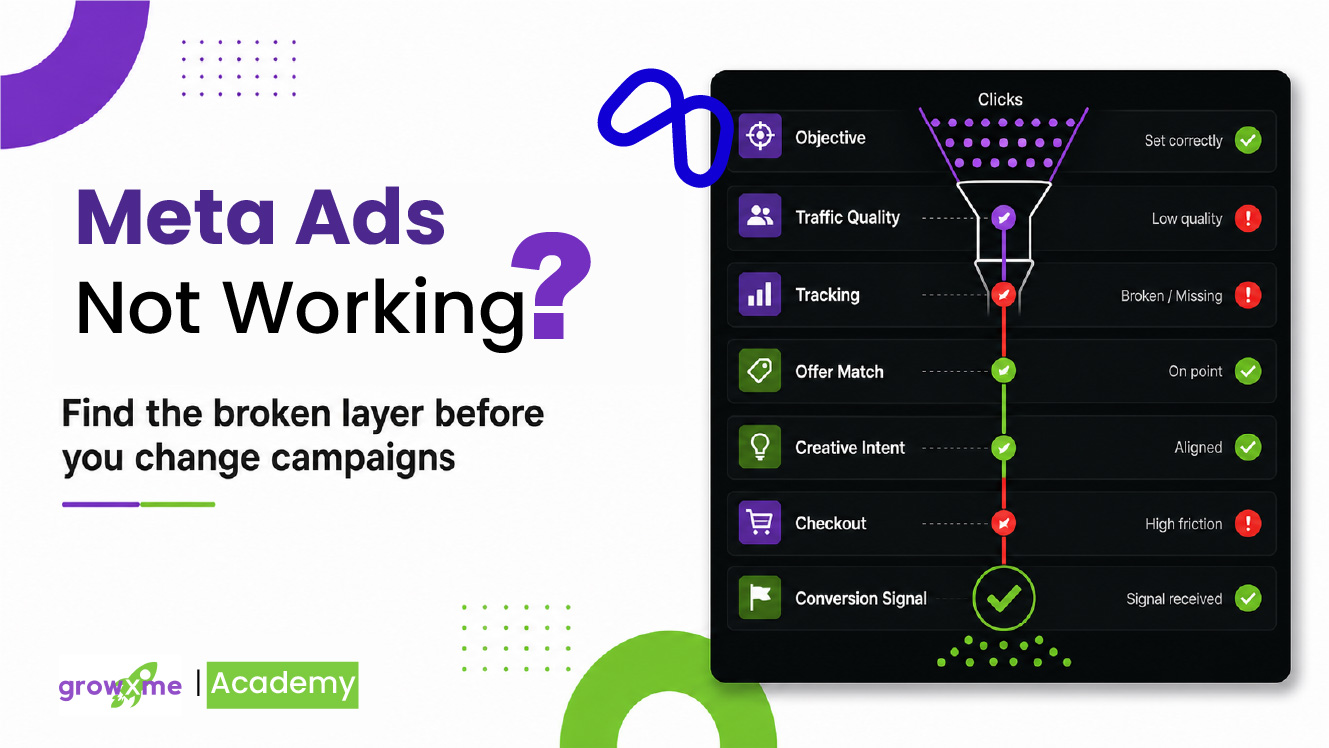
That is why the first mistake is usually not the bad campaign itself.
The first mistake is changing too many things before you know what is actually broken.
If your campaigns are spending but not producing meaningful conversion signals such as purchases, installs, qualified leads, or downstream actions, the goal is not to fall into panic-editing mode.
The first order of business is to find the constraint that is stopping attention from turning into reliable conversion feedback.
Do not fix everything. Find the broken layer first.
Campaign is spending but not producing meaningful output.
Objective, budget, tracking, traffic, offer, creative, trust, or scale.
Change the layer that is actually blocking conversion feedback.
Let the signal become readable before making the next major call.
If Meta, Facebook, Or Instagram Ads Are Not Converting, Check These First
Before you start rebuilding campaigns, ask these questions:
OutcomeAre you optimizing for the real business outcome?
BudgetIs the budget large enough to support the event you want?
TrackingAre conversion events reporting correctly?
TrafficAre placements sending commercially useful traffic?
Buying PathDoes the ad match the landing page, product, price, and offer?
TrustAre comments and brand trust helping or hurting conversion?
CreativeIs the ad creating buying intent, or just curiosity?
TimingAre you judging too early, or waiting too long while the budget bleeds?
This article is written for ecommerce, Direct-To-Consumer, Shopify, mobile apps, and growth-stage brands that need a practical diagnosis before making another potentially wasteful round of changes inside Meta Ads Manager.
Start With This: Know When To Wait And When To Fix Immediately
A lot of advertisers are told to “wait three days” before touching anything. That advice has some truth behind it, and we often recommend a version of the same principle, but it becomes expensive when it is applied blindly.
This is where many advertisers get trapped in panic-editing. They change the account before they know whether the issue is a broken setup, a weak signal environment, a bad traffic source, an offer mismatch, or just early noise after a major change.
Inside GrowXme’s HVR logic, the better way to think about it is this: not all changes deserve the same waiting period.
Fix wrong links, expired offers, out-of-stock products, broken tracking, bad country traffic, or placements sending junk traffic.
If several small issues belong to the same problem, fix them together instead of stretching basic hygiene work across the month.
If spend and signal volume are enough, check early signs after 48 hours without treating it as a final judgement.
For major structural changes, give the account enough time for the first learning shock to settle.
Use a full week when signal volume is thin, weekday behavior matters, or the account has been volatile.
If spend reaches around 5x target CPA without a meaningful deep-funnel signal, waiting longer is usually waste.
A meaningful deep-funnel signal could be an add-to-cart, checkout, lead, install, qualified lead, booking, or another event that shows the traffic is doing more than just clicking.
Check 1: Is The Campaign Optimized For The Outcome You Want?
If you want purchases, the campaign should usually be built around purchases. If you want installs, the campaign should be optimized for installs or stronger downstream app events once enough data exists. If you want qualified leads, the system needs to know what a qualified lead looks like, not just what a form submit looks like.
Sometimes Meta is doing exactly what the account asked it to do. It is finding people who click, watch, add to cart, or submit low-intent forms. That does not mean it is finding people who buy or actually convert.
Campaign objective lives at the campaign level. Conversion location, performance goal, and optimization event usually live at the ad set level. Creative, copy, and destination URL live at the ad level.
If the business wants purchases, use a Sales objective and optimize toward Purchase once tracking and event quality are clean enough. If the objective is wrong, launch a new campaign; published campaign objectives cannot be changed.
Reality Check: If the campaign is optimized for traffic, landing page views, engagement, or add-to-cart activity, do not judge it like a purchase campaign. People who click are not always people who buy.
Check 2: Is The Budget Large Enough To Create A Signal?
Even when the campaign objective is correct, the account still needs enough budget relative to the expected CPA to generate useful conversion feedback.
As a practical HVR minimum, if the daily budget is below roughly 1.5x your target CPA, the account may be underfunded for confident diagnosis. That does not mean there is no hope. It means the system is operating with fragile signal volume.
There is another practical layer here: if the total budget is already low and it is spread across too many active campaigns or ad sets, the account may be starving every learning path all at once.
For purchase optimization, we generally treat anything below about $35 per ad set per day as too thin to expect useful purchase learning in most ecommerce situations. That does not mean $35 is a magic number. It means that below that level, the campaign often does not have enough daily signal support to make useful decisions.
Check whether the budget is set at the campaign level through campaign budget optimization or at the ad set level through ad set budgets. Then compare daily spend against expected CPA.
If the budget is too thin, do not keep adding campaigns and ad sets. Thin the structure down so Meta has a better chance of collecting useful signals.
Use this as a quick diagnostic starting point, not a guarantee of scale readiness.
Check 3: Is Tracking Actually Reporting Conversions Back To Meta?
Before judging the ads, check whether Meta is receiving reliable conversion feedback.
Sometimes sales are happening, but Meta is not receiving the purchase event properly. Sometimes the CMS shows the order and even shows UTM data connected to the campaign, but the purchase is delayed, unattributed, or not reported back to Meta cleanly.
For app campaigns, the same issue can happen through SDK or app event reporting delays. For ecommerce, Shopify, Shop Pay, third-party checkout flows, payment apps, and custom CMS setups can all create attribution gaps.
Start in Events Manager. Check Pixel, CAPI, important conversion events, diagnostics, and Event Match Quality. Then cross-check Meta reporting against Shopify, CMS, payment processor, backend order data, and UTMs. If the team calls this a Facebook Ads or FB Ads issue, the tracking check still starts here.
For Shopify, reconnect through the official Facebook & Instagram by Meta setup if needed. Do this carefully, because switching to a new Pixel can lead to lost conversion learning history.
If Event Match Quality is weak or below the level you normally expect, coordinate with your webmaster, theme developer, or official CMS support team. As a working benchmark, we usually start paying closer attention when Event Match Quality falls below roughly 8.5, especially if purchase reporting also looks delayed, duplicated, or incomplete.
Real Account Pattern: We have seen cases where the business dashboard shows a purchase with campaign-level UTM data, but Meta does not receive the attributed purchase event for hours, or sometimes not at all. From Meta’s learning system, the feedback loop is incomplete.
Check 4: Are You Buying Useful Traffic Or Just Cheap Activity?
If Meta Ads are not converting but the account is getting cheap clicks, check placement quality before assuming the creative is working.
Instagram Ads, Insta Ads, Facebook Feed, Reels, Stories, and Audience Network can each create different traffic quality. Cheap clicks are only useful when they keep moving toward add-to-cart, checkout, purchase, install, lead, or another meaningful downstream action.
Audience Network can create misleading traffic in many accounts. It may generate clicks, low CPC, or surface-level activity, but those clicks do not always behave like high-intent buyers.
Cheap clicks are not the same as commercially useful traffic.
In Meta Ads Manager, use breakdowns by placement, platform, country, region, and device. Compare Facebook, Instagram, Audience Network, and other placements against downstream actions. Placement and audience controls live at the ad set level.
If Audience Network or another placement is producing cheap clicks but no meaningful downstream action, isolate the issue. To manually control placements, move away from Advantage+ placements at the ad set level.
COD sidenote: In markets where cash on delivery or pay-on-delivery is common, order quality can become a separate issue. If the business wants prepaid orders, the checkout needs to give users a stronger reason to pay upfront.
Check 5: Did The Buying Path Change After The Click?
One of the fastest ways to lose conversions is to create a gap between what the ad promised and what the landing page actually shows.
Do not check the homepage. Do not check the product page you assume is connected. Open the exact URL attached to the ad.
What To Compare
Product, discount, bundle, headline, creative angle, stock status, checkout path, price, expired offer, and mobile usability.
Where To Check This
Go to the ad level and open the exact destination URL attached to the creative. If there are multiple ads, check the exact URL for each active creative, especially the ones spending the most.
What To Fix
If the ad promise and landing page do not match, fix that before changing targeting. A strong ad can still fail if the page breaks the expectation it created.
Real Account Pattern: With one medical equipment D2C account, an April bundle offer was driving strong growth. Then performance dropped around the end of April. The landing page still loaded, but the discounted bundle that had been selling at $99 was now showing at $160 while the creative still built expectation around the discounted bundle. That is not a Meta algorithm problem. That is a buying-path continuity problem.
Summary Until Now
By this point, you should already have a cleaner view of where the issue may be coming from.
Campaign is optimized for the wrong behavior.
Budget is too thin to generate reliable signal.
Tracking is not reporting conversions cleanly.
Audience Network or placement quality is distorting traffic.
The ad promise does not match the landing page.
The offer, bundle, price, or inventory changed.
If these basics are broken, do not jump straight into “the algorithm is bad” or “creative fatigue killed the campaign.” Fix the obvious constraint first.
Check 6: Is The Creative Creating Intent, Or Just Curiosity?
A creative can get attention and still fail to create conversion intent.
This happens when the ad is visually strong, emotionally interesting, funny, dramatic, or unusual, but does not pre-qualify the buyer. People click because the ad caught their attention, not because the product, price, use case, or offer feels relevant enough to buy.
Look at CTR, CPC, add-to-cart rate, checkout initiation, purchase rate, and post-click behavior together.
Make the creative more qualifying. Show the price range, use case, buyer problem, proof, objections, or more specific offer framing.
Reality Check: Attention is not the same as intent. If the ad creates clicks but the page does not produce meaningful downstream behavior, the creative may be entertaining the wrong audience.
Check 7: Is This Actually Creative Fatigue?
Creative fatigue is real, but it is often used as the first explanation before the account has been checked properly.
Before calling it fatigue, look at whether the same people are seeing the same creative too often, whether frequency has risen, whether CTR is declining, whether CPM is increasing, and whether conversion rate is weakening at the same time.
Check frequency, CTR, CPM, CPA, conversion rate, and creative-level performance. Also check comments for signs users are tired of seeing the same ad.
Refresh the angle, hook, proof, offer framing, format, or audience entry point. Do not only duplicate the same ad with tiny changes.
Reality Check: Creative fatigue is not just “the ad got old.” It is usually the point where the creative stops producing useful response from the audience it is reaching.
Check 8: Are Comments, Profile Trust, And Social Proof Helping Or Hurting?
For startup brands, young ecommerce businesses, and newer DTC brands, trust is part of the conversion path.
Cold users often click the ad, scan the product page, check comments, visit the profile, look at post history, and try to decide whether the brand feels real.
Check ad previews, post comments, Instagram and Facebook profile activity, recent posts, pinned comments, and direct buying questions. Use Meta Comments Manager when useful.
Reply to buying questions. Handle concerns about delivery, warranty, sizing, authenticity, returns, payment safety, and product quality.
Real Account Pattern: A media buyer can stay inside Ads Manager trying to understand why CTR is fine but conversions are weak, while the actual issue is in the comments. Clicks get people to the door. Trust helps them finish the purchase.
Check 9: Is Checkout Creating Sticker Shock Or Payment Friction?
Sometimes the user wants the product, but the checkout changes the perceived value.
If the cart feels like a $50 purchase and checkout turns it into $63 because of taxes, shipping, or added fees, the user may feel the offer is no longer what they expected.
There are also more basic checkout issues: discount codes not applying, payment gateways failing, missing payment methods, currency issues, mobile checkout bugs, or delivery information being unclear.
Go through checkout on mobile and desktop. Check product page price, cart price, shipping, taxes, payment methods, delivery information, return policy, discount codes, and final cost changes.
Show shipping or tax expectations earlier, clarify return and delivery safety, make payment options clear, and create prepaid incentives where relevant.
Check 10: Are You Editing So Much That The Account Cannot Stabilize?
Sometimes Meta Ads are not converting because the account never gets a clean enough window to learn.
Budget changes, new ads, paused ads, audience edits, landing page changes, bid changes, and offer changes all create new conditions. Some changes are necessary. But if the account is being edited constantly, it becomes harder to know what actually caused the result.
Look at account change history and recent campaign edits. Check whether performance changed after budget, creative, bid, landing page, offer, audience, or placement changes.
Stop stacking unrelated changes. Group related fixes together, then give the system a reasonable window to respond unless spend is clearly being wasted.
Check 11: Did Scaling Pressure Expose A Deeper System Problem?
If Meta Ads stopped converting after a budget increase, the issue may move beyond basic troubleshooting.
Scaling changes the environment. It can push the account into broader audiences, weaker demand pockets, less consistent conversion behavior, and lower marginal efficiency.
Compare performance before and after the budget increase. Look at CPA, ROAS, conversion volume, daily consistency, audience expansion, frequency, placement mix, and whether conversion volume grew with spend.
If the basics are clean but performance remains unstable under higher spend, stabilize signal flow, learning quality, offer strength, structure, and creative quality before pushing more budget.
If spend increased but conversion volume stayed flat or softened, you may not be scaling. You may be diluting signal.
What About Auction Pressure, CPMs, And Competition?
Sometimes the account is not broken in isolation. The buying environment may have become more expensive.
If CPM rises sharply, the same CTR and conversion rate can become less profitable. Competition, seasonal demand, promotional periods, or market shifts can all make the same traffic harder to buy profitably.
Reality Check: This is not an excuse to blame the auction for everything. Read CPM, CTR, CPA, conversion rate, and ROAS together.
App Marketing Version
For app advertisers, “not converting” may mean the campaign gets clicks but no installs, installs but weak downstream events, or installs that do not turn into retained users.
The ad has to match the app store page. The screenshots and reviews need to support the promise. Country quality matters because cheap installs from the wrong markets can distort learning. SDK events need to be reported cleanly, and the campaign should eventually optimize toward meaningful in-app actions, not just installs, once enough event volume exists.
Check app store page, app event setup, SDK reporting, country breakdown, install-to-registration rate, registration-to-action rate, and downstream quality events.
If the campaign gets installs but no meaningful app activity, review store-page match, onboarding friction, SDK events, and whether optimization is focused on the right event.
Lead Gen Version
For lead generation, the failure point may happen after the click or even after the lead.
A campaign can generate clicks and form fills, but still fail commercially if the CRM integration is weak, the sales team responds too late, the lead quality is poor, or the conversion cycle is longer than the ad account is being judged on.
Check form quality, CRM integration, lead delivery speed, sales follow-up time, lead qualification, and the gap between lead volume and actual pipeline.
Fix CRM routing, follow-up speed, lead qualification, and the handoff between marketing and sales before assuming the ad is the only problem.
What To Fix First
Fix tracking first.
Launch the correct campaign objective before judging performance.
Fix the buying path before changing targeting.
Fix inventory and offer continuity.
Check Facebook and Instagram placement mix, Audience Network, countries, and low-intent segments.
Simplify structure, consolidate spend, and adjust expectations.
Move into deeper HVR readiness: signal flow, learning quality, efficiency under spend, and stability before scale.
Need Help Finding The Broken Layer?
If your Meta, Facebook, or Instagram ads are not converting, the answer is rarely one isolated fix. The campaign, offer, landing page, tracking, traffic quality, and conversion feedback need to be diagnosed together.
TL;DR
Meta Ads not converting is a symptom, not a diagnosis. The same is true when the business owner describes the issue as Facebook Ads not converting, FB Ads wasting spend, Instagram Ads not converting, or Insta Ads getting attention without sales.
Before changing campaigns, check whether the objective matches the outcome, the budget can support enough signal, tracking is clean, placements and countries are commercially useful, the ad promise matches the landing page, the offer is still active, creative is creating real intent, trust is strong enough, and checkout is not creating friction.
Use timing discipline without becoming passive. Fix obvious breaks immediately, review directional signs after 48 hours when volume supports it, avoid judging major changes too early, use 7 days for stronger stability reads, and stop waste if spend reaches around 5x target CPA without a meaningful deep-funnel signal.
FAQ
Why are my Meta Ads not converting?
Meta Ads usually do not convert when the campaign is optimized for the wrong outcome, the account does not have enough budget-to-signal support, tracking is unreliable, traffic quality is weak, or the buying path breaks after the click. Start by checking campaign objective, ad set optimization event, Events Manager, placement breakdowns, and the exact ad URL before changing campaigns.
Why are my Facebook Ads or Instagram Ads not converting?
Facebook Ads, FB Ads, Instagram Ads, and Insta Ads can stop converting for the same reasons Meta Ads do: the campaign may be optimized for the wrong event, the placement mix may be sending weak traffic, tracking may be incomplete, or the ad promise may not match the landing page, offer, trust layer, or checkout path.
What should I check first when Meta Ads are spending but not converting?
If Meta Ads are spending but not converting, check the diagnosis in this order: objective alignment, budget-to-CPA fit, tracking reliability, placement quality, ad-to-page match, offer availability, creative intent, trust signals, and checkout friction. If those basics are clean but performance is still unstable, use the HVR Readiness Calculator to check whether the account has a deeper signal or learning-quality issue.
How long should I wait before changing a Meta Ads campaign?
You should fix obvious breaks immediately, such as broken links, expired offers, out-of-stock products, bad traffic locations, or broken tracking. For major campaign changes, use a 48-hour directional check, a 72-hour major decision window, and a 7-day stability review when signal volume is thin. If spend reaches around 5x target CPA without any meaningful deep-funnel signal, stop or scale back instead of waiting blindly. For the pre-scale version of this logic, read how to stabilize Meta Ads before scaling.
Should I turn off Meta Ads after one bad day?
You usually should not turn off Meta Ads after one bad day unless there is clear waste, broken tracking, wrong traffic, or the campaign has spent around 5x your target CPA without a meaningful deep-funnel action. One bad day can be normal noise, but repeated weak signal, rising CPA, falling conversion rate, or broken buying-path conditions need diagnosis.
What budget do I need for Meta Ads purchase optimization?
For Meta Ads purchase optimization, daily budget should ideally be at least around 1.5x your target CPA as a bare minimum signal-support threshold. In ecommerce campaigns, ad sets spending below about $35/day are often too thin to produce useful purchase learning. If budget is limited, simplify the account structure instead of spreading spend across too many campaigns or ad sets. You can also use the HVR Readiness Calculator for a broader scale-readiness check.
Can Audience Network cause Meta Ads to get low-quality clicks?
Yes, Audience Network can sometimes produce cheap clicks that do not turn into useful downstream actions. Check placement breakdowns in Ads Manager and compare Audience Network clicks against add-to-carts, checkouts, purchases, installs, or leads. If a placement creates activity without conversion quality, reduce or isolate that traffic.
How do I know if Meta Ads are not converting because of creative fatigue?
Meta Ads may be suffering from creative fatigue when frequency rises, CTR declines, CPM or CPA increases, conversion rate softens, and comments show signs of repetition fatigue. Creative fatigue is more likely when the decline is isolated to specific ads or angles, not when tracking, offer continuity, traffic quality, or checkout conditions are broken across the account.
Why are my Facebook Ads getting clicks but no sales?
Facebook Ads can get clicks but no sales when the creative attracts curiosity instead of purchase intent, the landing page does not match the ad promise, the offer is weak, the product is unavailable, checkout creates friction, or Meta is not receiving clean purchase feedback. For a deeper post-click diagnosis, read why Meta Ads get clicks but no sales.
What should ecommerce brands check first when Meta Ads are not converting?
Ecommerce brands should first check Sales objective, Purchase optimization, budget-to-CPA fit, Pixel/CAPI tracking, placement quality, ad-to-product match, product availability, discount or bundle continuity, comments, trust signals, checkout cost, shipping, taxes, and payment issues. These checks should happen before rebuilding campaign structure.
What should app advertisers check first when Meta Ads are not converting?
App advertisers should check whether the ad matches the app store page, whether installs are coming from the right countries, whether SDK events are reporting correctly, and whether users are completing meaningful downstream actions after install. If installs are cheap but downstream quality is weak, the campaign may be learning from low-quality app users.
When should I book a Meta Ads audit?
Book a Meta Ads audit when objective, tracking, traffic quality, offer, landing page, and checkout basics are clean but performance still feels unstable. An audit is especially useful when spend increases without proportional output, CPA or ROAS swings are hard to explain, or you need to know whether the account is structurally ready to scale. You can book a GrowXme Meta Ads Audit Call if you want help finding the broken layer.