
Why Your Meta Ads Get Clicks But No Sales (And What To Check First)
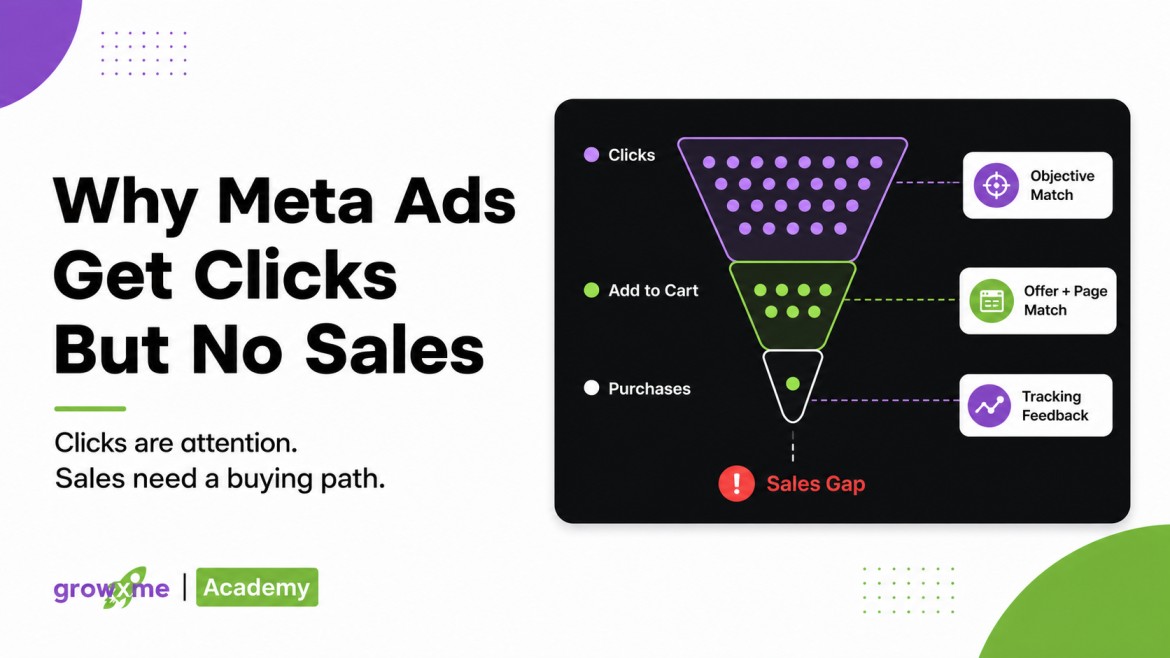
Meta Ads can get clicks without sales when the campaign is attracting attention but not creating enough purchase intent, trust, offer alignment, or clean conversion feedback for the system to learn from.
For ecommerce, D2C, and Shopify brands, the problem is often not that Meta, Facebook, or Instagram cannot send traffic. The problem is that the traffic is not turning into a buying path the account can actually learn from.
A click is only proof that someone was interested enough to visit. It is not proof that the person was ready to buy, that the offer made sense, that the page matched the ad, that the product was available, or that Meta received a reliable purchase signal afterward.
A click only becomes useful when the buying path and feedback loop stay intact.
Attention earned
Promise confirmed
Intent strengthened
Friction handled
Meta learns
That’s why this issue is easy to misread. The campaign may show traffic, CTR may look fine, CPC may look cheap, and the ad account may look active. But if sales are not happening, or if they are happening without being reported back cleanly, the system is not getting the feedback it needs to improve.
Before we start putting the blame on the algorithm, on creative fatigue, or on the landing page in isolation, the better question would be:
Where is the buying path breaking?
After working through ecommerce, D2C, Shopify, app, and startup ad accounts, these are the issues we check before blaming Meta or rebuilding campaigns.
Campaign Objective Alignment
Is your ad campaign truly aligned with your objective?
If the business wants purchases, the campaign should usually be built around purchases.
Sounds obvious, doesn’t it? But this is one of the first things we check when an ecommerce or DTC brand says their ads are getting clicks but no sales. Is the campaign actually running under a Sales objective? Is it optimizing for purchases, or is it optimizing for traffic, landing page views, add-to-carts, leads, or some other softer event?
Traffic campaigns can have a role in some situations, but they should not be the default if the real business problem is purchase growth.
There are exceptions. If the product has a deeper consideration cycle, like a pre-order funnel, a higher-ticket product, or a category where users need repeated exposure before converting, traffic or awareness may play a supporting role.
Traffic campaigns can assist purchase behavior in rare cases, but only when the offer, category, pricing, and creative environment make that exposure useful. I still would not make traffic the default if the business problem is purchases.
GrowXme reality checkBut that does not make traffic campaigns the default answer.
If you want purchases, the account needs to be trained around purchase behavior. Otherwise, Meta may do exactly what you asked it to do: find people who click.
And people who click a Facebook ad, Instagram Story, Reel, or Feed placement are not always people who buy.
The same goes for add to cart (ATC) campaigns. You have to be cognizant about what kind of user persona do you want the Meta algo to generate and train on. If you want sales but are running add to cart campaigns heavily, you’re basically signalling to Facebook’s ad algorithm that you value users who add to cart. Whether those ATCs actually convert or not is no longer Meta’s problem.
If the goal is purchases, move the campaign toward Sales objective and purchase optimization once tracking and event quality are clean. Do not judge purchase performance from traffic-optimized campaigns.
Purchase Optimization Still Needs Enough Signal
Even when the objective is correct, the account still needs enough daily budget relative to the expected Cost Per Acquisition (CPA) to generate useful conversion feedback.
This is where a lot of brands get stuck. They switch to purchase optimization, but the campaign does not have enough budget to generate purchase signals consistently. The system is technically optimizing for the right event, but it is not receiving enough feedback to learn from that event properly.
Here’s an example: suppose your ideal or average CPA is $35. In HVR terms, daily budget under roughly 1.5x target CPA can leave the campaign signal-starved, while 3x+ target CPA usually gives the account a stronger chance of generating feedback more regularly. This is a heuristic, not a universal law, but it is a useful way to think about budget-to-signal fit.
That is one of the reasons we look at budget-to-CPA fit inside the High Velocity Readiness (HVR) framework. If the daily budget is too thin relative to the target CPA, the campaign may not produce enough conversion feedback for Meta to understand who actually buys.
So when an ecommerce brand says, “We are getting clicks but no sales,” the answer is not always “your landing page is bad.” Sometimes the account is simply not giving Meta enough purchase events to learn from.
Is the system generating enough purchase feedback to support the optimization event it is using?
If not, the account may keep collecting clicks without building a reliable purchase-learning loop.
Check daily spend against expected CPA. If the campaign cannot generate enough purchase events, either increase budget carefully, optimize toward a nearer qualified event temporarily, or reduce friction so purchases happen more consistently. If you are unsure whether the account has enough signal to scale, use the HVR Readiness Calculator.
Cheap Clicks Can Be Misleading
A high CTR or cheap CPC can look promising, but it can also hide the problem.
We’ve seen this come up again and again. Reddit is full of posts where advertisers wonder whether cheap clicks are bot traffic, and sometimes there may be traffic-quality issues. But even when the clicks are real, they may still be curiosity clicks.
Sometimes the creative is attracting curiosity rather than buying intent.
Your ad’s audience clicks because the product looks unusual, the claim is interesting, the visual is strong, or the ad creates a quick emotional reaction. But once they land on the page, the offer does not feel strong enough, the brand does not feel trustworthy, or the product does not feel urgent enough to buy.
This is where advertisers can get trapped by surface metrics. The ad may be doing a good job at earning attention. But attention is not the same as purchase intent.
If clicks are cheap but sales are missing, we want to know whether the creative is pre-qualifying buyers or simply pulling in curiosity traffic. For ecommerce and Shopify stores, this matters a lot because the campaign is not only paying for visits. It is trying to generate purchase signals that help the system improve.
If the traffic does not create purchases, the campaign may keep learning from weak signals or no signals at all.
Compare CTR and CPC with add-to-cart rate, checkout rate, purchase rate, and country quality. If clicks are cheap but sales are missing, revise the creative so it qualifies buyers more clearly: show the price or offer context, make the product use case obvious, reduce vague curiosity hooks, and make sure the promise in the ad is something the landing page can actually deliver.
Check The Exact Link The Ad Is Sending People To
Once the campaign objective and click quality are checked, the next step is simple but often skipped: open the exact ad link.
Not the homepage. Not the page the team thinks is connected. The exact URL attached to the ad creative.
Then compare the ad promise against the landing page reality.
Is the ad sending users to the same product or category the creative sold?
If the ad mentions a discount, is that discount visible and still active on the page?
If the creative sold a bundle, is the bundle still available at the expected price?
Does the page headline and content continue the same benefit or problem the ad introduced?
Is the product actually in stock and ready to buy?
Can the user move from page to cart to checkout without surprise friction?
This is where many ad account discussions become too narrow. The media buyer stays inside Ads Manager trying to understand why performance dropped, while the actual issue is sitting on the website.
For ecommerce and D2C brands, the ad and landing page are not separate systems. The ad creates the expectation, and the page either confirms or breaks it.
This is exactly what happened in the April bundle example below: the ad promise remained active, but the page reality changed.
If the ad promises one thing and the page shows another, the click dies after arrival.
Open the exact ad URL and compare the creative promise with the landing page headline, product, discount, price, bundle, and CTA. Fix mismatch before changing campaigns.
Inventory And Offer Issues Can Break Performance Real Fast
Inventory is a real issue, and it is easy to miss if the brand and agency are not communicating tightly.
The landing page can still exist, but the thing that made the offer convert may be gone.
Medical Equipment D2C Brand: April Bundle Offer
We saw this clearly with a medical equipment D2C brand we were running ads for.
They had an April bundle offer that was driving growth for the account. The offer was getting upwards of 5x ROAS, and CPA had been optimized from around $34 average CPA to the $9-$12 range using the HVR rulebook.
Then, around April 30, performance suddenly dropped.
At first, it looked like the usual ad account mystery. The campaigns were still active, the page still loaded, and there was no obvious technical break inside Ads Manager. But when we checked the actual landing page link, the issue became clear.
The discount offer was gone. The product bundle that had been selling for $99 was now being shown undiscounted at $160. The creative and offer were still built around the discounted bundle, but the landing page no longer matched the buying expectation created by the ad.
It became clear that it was not a Meta algorithm problem. That is an offer continuity problem.
And this is exactly why “clicks but no sales” should not be diagnosed only from inside the ad account.
Pause or update ads pointing to unavailable products, expired discounts, or changed bundles. Keep a live offer and inventory check between brand and media buyer.
Find Where The Buying Path Is Breaking
If your Meta, Facebook, or Instagram ads are getting clicks but not sales, the issue may be in the campaign objective, offer, landing page, checkout, tracking, or feedback loop. GrowXme can help diagnose the full path instead of guessing from Ads Manager alone.
Book A Meta Ads Audit CallTracking Can Also Paint A False Picture
Sometimes sales are occurring, but Meta is not receiving the conversion feedback properly. Other times, Meta may be over-reporting because the same event is firing twice.
Both cases distort the diagnosis.
As browser-side tracking has become less reliable because of privacy changes, server-side tracking and the Meta Conversions API have become more important for sending cleaner event data back to Meta. But the setup still needs to be correct.
If Pixel and the Conversion API (CAPI) are set up incorrectly, the same purchase event can sometimes be reported twice. That makes performance look stronger than it really is and can mislead budget decisions.
The opposite issue also happens. Shopify, Shop Pay, CMS setups, third-party checkout flows, or app/payment experiences may show that a purchase happened, and the CMS may even show UTM data connected to the campaign or ad name, but the purchase does not get reported back to Meta for hours, or sometimes not at all.
In some Shopify setups, the CMS can show the purchase and UTM data, but Meta may receive the event late or not receive it cleanly enough to attribute it back to the campaign. That means the sale exists, but the campaign may not learn from it properly.
GrowXme reality checkThe sale may exist in Shopify or the CMS, but if Meta does not receive the attributed purchase event properly, the campaign does not learn from that buyer in the way it should.
This is also why UTM setup matters. UTMs are tracking tags added to a URL so analytics tools, CMS dashboards, and reporting systems can understand where a click came from. UTMs do not replace proper Pixel, CAPI, or SDK implementation, but they help you cross-check what happened when platform reporting is delayed, incomplete, or wrong.
https://example.com/product?utm_source=meta&utm_campaign=april_bundle&utm_content=creative_01
It’s common knowledge at this point that Meta CAPI and SDK, which is used for app events tracking, reporting can also lag. A delay is not always a disaster by itself, but if the feedback loop is unreliable enough, the campaign can struggle to understand which traffic is actually valuable.
For a campaign to improve, it needs more than clicks. It needs reliable conversion feedback.
Test Pixel, CAPI, and SDK events, check for duplicate events, confirm Shopify or CMS orders against UTMs, and make sure purchases are reported back to Meta with attribution as cleanly as possible. For a simple explanation of URL parameters, Google’s guide to URL parameters is useful even outside Google Ads.
Facebook And Instagram Comments Can Break Trust
Another place we often check is the comment section and post engagement.
Are people asking doubts that nobody is answering?
A media buyer may ignore this if they are only looking at Ads Manager, but these doubts can directly affect buyer confidence.
Are comments questioning product quality, delivery time, sizing, warranty, authenticity, or trust?
These comments can become conversion blockers if the brand leaves them unanswered or handles them poorly.
Are negative comments being left unmanaged?
They may be doing serious damage, especially if the same concern appears repeatedly under active ads.
Are genuine buying questions being ignored?
You are missing out on valuable conversions and conversations when ready buyers ask and nobody responds.
For startup brands and newer ecommerce businesses, this matters more than many teams realize.
A cold buyer may click the ad, visit the Facebook or Instagram profile, check comments, scan the page, and look for signs that the brand is real. If the profile is incomplete, has very few posts, has low visible activity, or looks inactive, the user may hesitate before buying even if the product itself is interesting.
That does not mean every new brand needs a massive following before running ads. Don’t run off to buy fake followers. But the brand presence needs to reduce doubt, not create more of it.
Clicks can get people to the door. Trust gets them to complete the purchase.
Reply to buying questions, handle trust-breaking comments, pin helpful replies if needed, and make sure the profile looks active enough for cold users to trust.
Sticker Shock Is Real
A checkout sticker shock can kill the intent instantly.
Sometimes the user does want the product, but the final checkout experience changes the perceived value.
If the product looks like a $50 purchase in the cart and becomes $63 at checkout because of taxes, shipping, or added fees, the user may feel the offer is no longer what they expected.
That does not mean shipping or taxes are wrong. It means the experience needs to handle the expectation properly.
For some markets, payment behavior matters too. If pay-on-delivery or COD behavior is common, and the business wants prepaid orders, the checkout needs to create a stronger reason to pay upfront. That might be a prepaid discount, faster dispatch, lower shipping, bonus value, clearer payment safety, or stronger return and delivery reassurance.
This is not just a conversion-rate detail. It affects the quality of feedback the ad account receives.
If users click with intent but abandon because the final payment experience feels risky or different from what they expected, Meta sees weak purchase feedback and has less useful data to optimize from.
Show shipping and tax expectations earlier, offer prepaid incentives where relevant, clarify return and payment safety, or adjust threshold offers so final checkout does not feel like a surprise.
It is often a good idea to let the product cost absorb part of the shipping rate and provide free or discounted shipping fee, instead of surprising the user at checkout.
Watch The Countries Your Traffic Is Coming From
Another issue we watch closely, especially with new ad accounts, is country quality. I know, this is why so many advertisers distrust Meta.
If the brand sells in the US, UK, Canada, Australia, the UAE, or EU markets, the campaign needs to be checked for whether traffic is actually coming from places the brand can serve profitably.
Sometimes newer accounts attract cheap clicks from countries or regions the business did not intend to prioritize, cannot ship to, cannot service, or does not want leads from. If that happens, the numbers may look active, but the traffic is not commercially useful.
If a country is sending low-quality clicks, cannot be served, or is outside the actual market strategy, it should be excluded quickly instead of letting cheap traffic pollute the campaign’s learning.
This is especially important when the account is still early and Meta has limited conversion feedback. Bad traffic early on can shape the wrong learning patterns.
You’re not only solving for “are we getting clicks?”, you’re also asking the question: are we getting clicks from the markets we actually want to win?
Check location breakdowns in your Ads Manager report and exclude countries or regions the business cannot serve or does not want to win.
If you see traffic coming from countries you cannot serve or do not want to win, add those countries to your exclusion list as soon as possible. In Meta Ads Manager, review your campaign or ad set location settings and add excluded locations for countries or regions that should not receive delivery. This is especially important if you are using Advantage+ audience or broad targeting, because Meta may explore outside the audience you expected unless your exclusions are tight.
Scaling Brands Have A Different Version Of This Problem
For new brands, clicks without sales often comes down to objective mismatch, weak trust, poor offer clarity, checkout friction, or a basic tracking problem.
For scaling brands, the issue can become more complex.
Multiple campaigns may be competing for the same users. Retargeting and interest-based audiences may overlap. One campaign may influence the sale while another claims credit. The account may be spending into audiences that are already saturated or no longer responding to the same creative angle.
This does not mean every overlap is bad, but it does mean the diagnosis needs to account for how campaigns interact with each other.
If a scaling brand is getting clicks but no incremental sales, we need to know whether those clicks are creating new demand, repeating exposure to the same users, or simply moving attribution around inside the account.
That is where this issue connects back to HVR and marginal efficiency. If more traffic does not create more output, the system is not scaling. It is just spending.
Review audience and campaign overlap, retargeting structure, and whether extra clicks are creating incremental purchases or just shifting attribution. If this is happening while spend is increasing, use the HVR Readiness Calculator to check whether the account is actually ready to scale.
What About App Installs And Lead Gen?
This article is mainly written for ecommerce, DTC, D2C, and Shopify brands, but the same logic applies in other ways.
For app advertisers, clicks without installs can point to store-page mismatch, weak app store trust, poor screenshots, weak reviews, country mismatch, SDK reporting delays, or a campaign optimized toward the wrong event. The ad may earn attention, but the app store page still has to close the install.
For lead generation, the problem is different again. A campaign may generate clicks or even leads, but the sales cycle may be long, the CRM integration may be weak, or the sales team may not follow up quickly enough. In some lead gen accounts, the issue is not getting the lead. It is whether the lead becomes reachable, qualified, and acted on while intent is still warm.
That is why the diagnosis has to match the business model. Ecommerce, app installs, and lead gen all need feedback, but the conversion path and the failure points are not the same.
Scaling Brands Have A Different Version Of This Problem
For new brands, clicks without sales often comes down to objective mismatch, weak trust, poor offer clarity, checkout friction, or a basic tracking problem.
For scaling brands, the issue can become more complex.
Multiple campaigns may be competing for the same users. Retargeting and interest-based audiences may overlap. One campaign may influence the sale while another claims credit. The account may be spending into audiences that are already saturated or no longer responding to the same creative angle.
This does not mean every overlap is bad, but it does mean the diagnosis needs to account for how campaigns interact with each other.
If a scaling brand is getting clicks but no incremental sales, we need to know whether those clicks are creating new demand, repeating exposure to the same users, or simply moving attribution around inside the account.
That is where this issue connects back to HVR and marginal efficiency. If more traffic does not create more output, the system is not scaling. It is just spending.
Review audience and campaign overlap, retargeting structure, and whether extra clicks are creating incremental purchases or just shifting attribution. If this is happening while spend is increasing, use the HVR Readiness Calculator to check whether the account is actually ready to scale.
What About App Installs And Lead Gen?
This article is mainly written for ecommerce, DTC, D2C, and Shopify brands, but the same logic applies in other ways.
For app advertisers, clicks without installs can point to store-page mismatch, weak app store trust, poor screenshots, weak reviews, country mismatch, SDK reporting delays, or a campaign optimized toward the wrong event. The ad may earn attention, but the app store page still has to close the install.
For lead generation, the problem is different again. A campaign may generate clicks or even leads, but the sales cycle may be long, the CRM integration may be weak, or the sales team may not follow up quickly enough. In some lead gen accounts, the issue is not getting the lead. It is whether the lead becomes reachable, qualified, and acted on while intent is still warm.
That is why the diagnosis has to match the business model. Ecommerce, app installs, and lead gen all need feedback, but the conversion path and the failure points are not the same.
What To Check First
If your Meta Ads are getting clicks but no sales, start with this sequence:
Are you running the right campaign objective for the outcome you want?
If you want purchases, are you optimizing for purchases?
Is the budget high enough relative to CPA to generate usable purchase signals?
Are CTR and CPC suggesting real buying intent or just curiosity clicks?
Does the ad promise match the landing page, product, offer, and checkout?
Is the product in stock and is the discount or bundle still active?
Are Pixel, CAPI, SDK, Shopify, Shop Pay, and UTMs reporting cleanly?
Are comments, profile quality, and social proof helping or hurting trust?
Is checkout creating sticker shock through taxes, shipping, or payment expectations?
Is traffic coming from countries the brand can actually serve and wants to win?
For scaling brands, are campaigns competing for the same users without creating incremental purchases?
If the basics are clean and the account still cannot turn clicks into purchases, the issue moves deeper.
That is when we start looking at signal quality, learning quality, demand quality, and whether the system is ready to scale.
TL;DR
Clicks are not sales. They are only the first sign of attention.
If Meta Ads, Facebook Ads, or Instagram Ads are getting clicks but no sales, check objective alignment, purchase optimization, budget-to-signal fit, click quality, ad-to-page match, offer availability, tracking reliability, social trust, checkout friction, and country quality before blaming the algorithm.
For ecommerce and DTC brands, the real issue is often that the campaign is creating attention without creating a clean enough buying path or feedback loop for Meta to learn from.
Once those basics are clean, the next question is whether the account can generate enough reliable purchase signals to support the spend level you are asking it to handle.
We call these issues the usual suspects. But if your campaigns are not a victim to these issues, there may be a deeper stability problem underneath. A good next read is how to stabilize Meta Ads before scaling.
Get A Clear Read On What Is Blocking Sales
If the obvious issues are clean but clicks still are not turning into sales, the next step is to map the account, offer, tracking, and conversion path together.
FAQ
Why are my Meta Ads getting clicks but no sales?
Meta Ads can get clicks without sales when the campaign is optimized for the wrong behavior, the traffic is low-intent, the landing page does not match the ad promise, the offer is weak, tracking is broken, or the checkout path creates friction. For ecommerce brands, the first checks should be campaign objective, purchase optimization, offer match, inventory, and conversion tracking.
Do Instagram Ads follow the same diagnosis?
Yes. Instagram Ads and Insta Ads can create strong attention without sales if Reels, Stories, Feed placements, or profile trust are bringing curiosity traffic instead of buyer intent. The diagnosis still starts with objective, placement quality, ad-to-page match, offer clarity, checkout friction, and purchase tracking, the same way it would for FB Ads on Feed or Reels placements.
Should I run traffic campaigns if I want purchases?
Usually, no. If the goal is purchases, Sales campaigns optimized for purchases are usually the better starting point. Traffic campaigns can support exposure in specific cases, such as deeper consideration funnels or large-scale brands with proven purchase assist behavior, but they should not be the default purchase-growth strategy.
Can Shopify or Shop Pay cause Meta Ads tracking problems?
Yes. Shopify, Shop Pay, CAPI, Pixel, or checkout configurations can create attribution gaps if purchases are not reported back to Meta properly. Sometimes the CMS shows the order and UTM data, but Meta receives the purchase late or not at all, which weakens campaign learning. The broader tracking layer connects to Meta’s Conversions API.
Why do my Facebook Ads get cheap clicks but no purchases?
Cheap clicks can mean the creative is attracting curiosity rather than purchase intent. A high CTR or low CPC is not always good if users do not trust the brand, understand the offer, match the target market, or complete the checkout.
What should ecommerce brands check first when Meta Ads are not converting?
Ecommerce brands should first check whether the campaign is optimized for purchases, whether the ad link matches the product and offer, whether the product is in stock, whether the discount is still active, whether tracking is clean, and whether checkout costs or payment expectations are hurting conversion. If those basics are clean, read how to stabilize Meta Ads before scaling.
Can wrong-country traffic cause clicks but no sales?
Yes. If traffic comes from countries the brand cannot service or does not want to prioritize, clicks may look cheap but fail to create sales. Newer ad accounts should monitor country-level traffic quality and exclude locations that are outside the real service market.
What should I do if the basics are clean but sales still are not coming in?
If objective, offer, page match, tracking, checkout, comments, and country quality are clean, the issue may be deeper: signal quality, Learning Quality, demand quality, or scale readiness. You can use the HVR Readiness Calculator or book a Meta Ads Audit Call.